Free

A WordPress plugin by CraftRoq

CraftRoq Forms

A drag and drop form builder for contact forms, surveys and order forms, with 25 free field types, calculations, stored entries, built-in SMTP and spam protection.

Read the step-by-step guide

Version
1.0.0
WordPress
6.5 or newer
PHP
8.1 or newer

On WordPress.orgTested with WordPress 7.1.5Updated October 4, 2026

The whole builder, free

Every field, every form, every entry. Nothing to unlock.

CraftRoq Forms is a drag and drop form builder for WordPress in which the free version is the whole builder. Pick a template or start blank, drag in the fields you need, and add the form to a page with a block or a shortcode. Every submission is saved as an entry and emailed to whoever should see it.

  • 25field types, all free
  • 7ready-made templates
  • 10SMTP provider presets
  • No limiton forms or entries

How it works

Up and running in three steps

What you can build

Six kinds of form, each a ready-made template

  1. Contact formswhose notification replies go straight to the visitor.
  2. Order and quote formswith products, quantities, delivery options and a live total.
  3. Surveys and feedback formswith star ratings, sliders and choices.
  4. Registration in several stepswith a progress bar and checks on every step.
  5. Job application formswith a CV upload.
  6. Newsletter signupswith a consent checkbox.
A multi-step form with a progress bar. Each step is checked before the next one opens.

25 field types

Nothing in the builder is held back

Every field type is free, including file upload, signature, repeater, address, products and calculations.

  • Single line text
  • Paragraph text
  • Email
  • Number
  • Dropdown
  • Multiple choice
  • Checkboxes
  • Name
  • Phone
  • Website
  • Date
  • Hidden field
  • Consent (GDPR)
  • File upload
  • Star rating
  • Range slider
  • Address
  • Signature
  • Repeater
  • Product
  • Calculation
  • Order total
  • Section heading
  • Custom HTML
  • Page break
  • Repeater fields let visitors add as many rows as they need, such as attendees or gift recipients.
  • Page breaks turn any form into a multi-step form with a progress bar or step titles.
  • Every field can have a width for side-by-side layouts, a placeholder, a default value, a description, and be required.

Calculations and order forms

Totals you can trust

Prices and formulas update live for the visitor, and the server works every number out again before saving, so stored values cannot be changed in the browser.

  • Product fields with a fixed price, a quantity, or price options as a dropdown, radio buttons or checkboxes.
  • Calculation fields with formulas such as {field:3} * {field:4}, brackets, and round(), ceil(), floor(), min(), max(), abs(), sqrt() and pow().
  • An order total in your currency that updates as visitors choose.

Product and total fields work without taking payment, which suits quotes, bookings and orders you invoice later. To take the money on the form, CraftRoq Forms Pro sends the total to Stripe or PayPal.

Try it How an order form’s total behaves. Nothing is sent.

Order

T-shirt$25.00
Mug$12.00
Delivery

Total$67.00

Entries

Every submission, kept on your own site

Entries are stored in the plugin’s own database tables, with no limit on how many.

  • Search, with unread, starred and trash views.
  • Open an entry to read it in full, star it, mark it unread, print it or move to the next one.
  • Bulk actions and CSV export, with a form’s fields as columns.
  • An unread count in the admin menu, so new entries are not missed.
  • Turn storage off for a form if you only want the email.

Notifications and SMTP

Email that arrives

Many hosts block or spam-filter mail sent from PHP. Send form notifications, or every email your site sends, through any SMTP server, with presets for ten providers.

  • Gmail
  • Microsoft 365
  • Yahoo
  • Zoho
  • SendGrid
  • Mailgun
  • Brevo
  • Postmark
  • Amazon SES
  • MailerSend

Notifications for each form

  • Any number of emails per form, for example one to you and one to the visitor.
  • Smart tags such as {field:2}, {all_fields}, {form_title} and {user_email} in the recipient, subject and message.
  • Reply-To set to the visitor, so you can answer from your inbox.
  • Afterwards: a confirmation message, a redirect to a page, or a redirect to any URL.
Built-in SMTP

  • The password is stored encrypted, or can be set in wp-config.php.
  • Send a test email and read the server’s replies when something is wrong.
  • A log of the last 50 notifications and whether they were sent.
  • Uploaded files can be attached to notification emails.

Spam, privacy and access

Careful by default

  • Spam blocked with no setup

    Every form has a honeypot field and a signed submit-time check, with nothing to configure. When you want more, switch on Google reCAPTCHA v2 or v3, hCaptcha or Cloudflare Turnstile per form.

  • Works with page caching

    Forms do not depend on a nonce in the page, so cached pages keep submitting.

  • Built for everyone

    Forms submit without a page reload, show errors beside the fields in a way screen readers announce, and still work with JavaScript turned off.

  • Privacy tools

    Works with WordPress’s personal data export and erase tools. Choose whether to store IP addresses and browser details, and delete entries automatically after a number of days.

  • No outside service by default

    Nothing is contacted unless you turn it on: a CAPTCHA, or the SMTP server you choose.

  • Move and back up forms

    Export forms with their fields and settings as a JSON file and import them on another site. Entries are exported separately as CSV. Turn a form on or off without removing it from the page.

For developers

Place it, style it, extend it

  • A shortcode, a “CraftRoq Form” block and a PHP function to place a form.
  • Every colour and size is a CSS custom property, and the plugin’s styles can be turned off.
  • Actions and filters for fields, validation, submissions, notifications and the builder.
  • Register your own field types on crforms_register_fields.
  • Translation ready. GPL-3.0-or-later.
[crforms id="1"]

Free and Pro

Pro adds to the free plugin. It never takes anything away from it.

CraftRoq Forms Pro is a separate add-on: install it next to CraftRoq Forms, and your forms and entries stay exactly where they are.

FeatureFreePro
All 25 field types and multi-step formsIncludedIncluded
Calculations, product and order total fieldsIncludedIncluded
Unlimited forms and entries, CSV exportIncludedIncluded
Email notifications, built-in SMTP and an email logIncludedIncluded
Honeypot, signed time check and CAPTCHAIncludedIncluded
Online payments with Stripe and PayPalNot includedIncluded
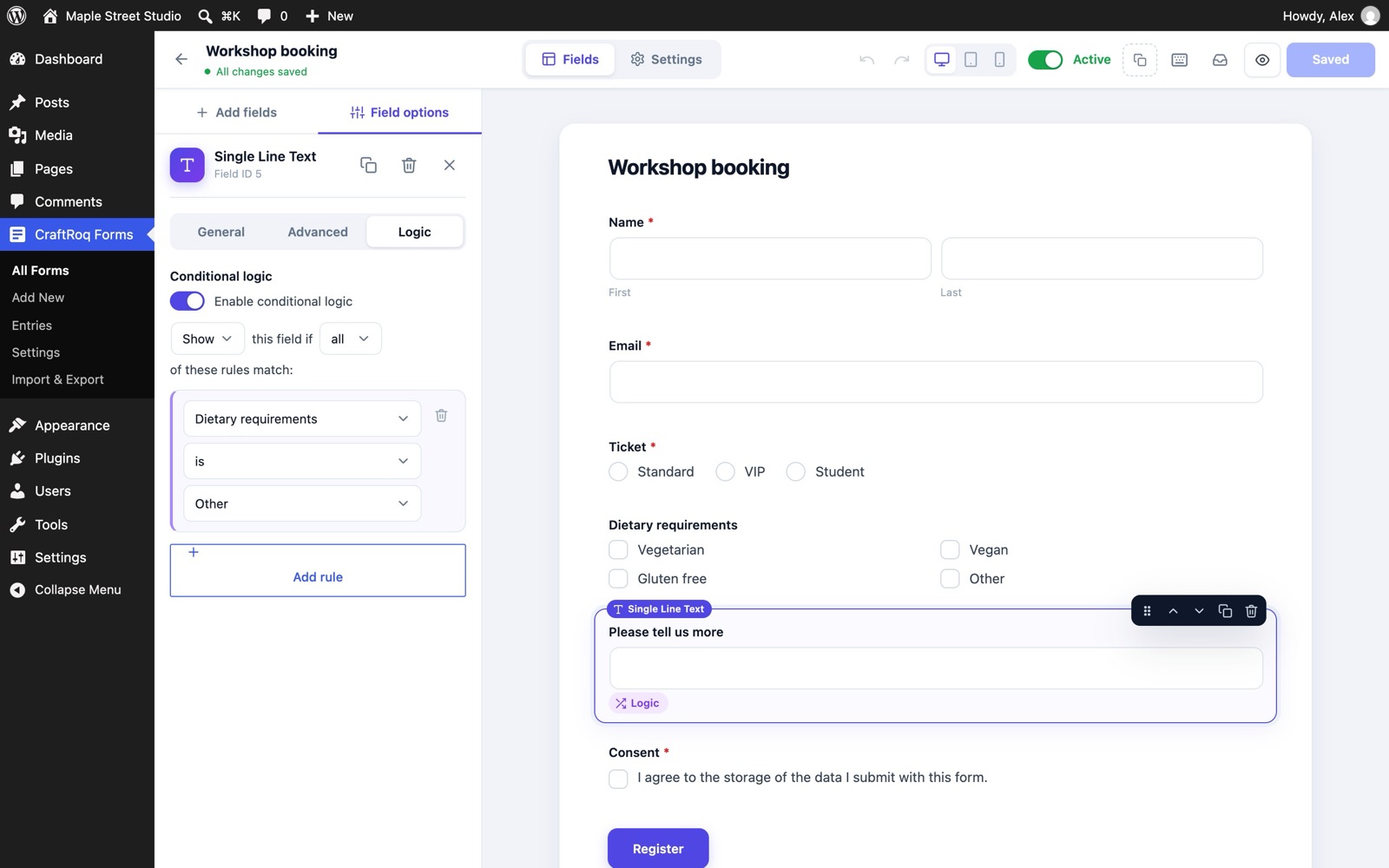
Conditional logicNot includedIncluded
Scheduling, entry limits and logged-in-only formsNot includedIncluded
Form styler and custom CSS per formNot includedIncluded
WebhooksNot includedIncluded
Mailchimp, HubSpot, ActiveCampaign and Google SheetsNot includedIncluded
Event registration and customer satisfaction templatesNot includedIncluded

See CraftRoq Forms Pro and pricing

Questions

Good to know before you install

Something else? Read the documentation or ask before you install.

Is the free version limited?

No. There is no limit on forms, fields or entries, and all 25 field types are included. The paid add-on adds separate features such as conditional logic and online payments.

How do I add a form to a page?

In the block editor, add the “CraftRoq Form” block and choose your form. Anywhere else, including page builders and widgets, paste the form’s shortcode, for example [crforms id="1"]. The shortcode is shown beside each form in the forms list.

Emails are not arriving. What now?

Many hosts block or spam-filter mail sent from PHP. Go to CraftRoq Forms › Settings › Email & SMTP, choose “SMTP server”, pick your provider and send a test email. If it fails, the SMTP conversation shown below the test tells you why.

Can I build a multi-step form?

Yes. Add a Page break field wherever a new step should start, or use the “Multi-step registration” template. Visitors see a progress bar or step titles, and each step is checked before the next one opens.

Can visitors upload files?

Yes. The File upload field accepts drag and drop. You choose the allowed file types and the maximum size per field, and the files can be attached to notification emails.

How do calculations work?

Add a Calculation field and type a formula. Click a field tag below the formula box to insert it. Choice fields count the value of the chosen option, checkboxes add up their checked values, and product fields count their line total (price × quantity).

Can I take payments?

Product and total fields are free and work without payments, for example for quotes and orders you invoice later. CraftRoq Forms Pro sends the order total to Stripe Checkout or PayPal.

Can I style the forms?

Override the CSS custom properties on .crforms-wrap, for example --crforms-primary, --crforms-radius and --crforms-border. Turn off the plugin’s styles in Settings to style forms from your theme.

Where is my data stored?

In three tables in your own database: {prefix}crforms_forms, {prefix}crforms_entries and {prefix}crforms_entrymeta. They are removed on uninstall only if you turn on “Delete all data” in Settings › Privacy & data.

Build your first form in about a minute.

Free on WordPress.org, with updates from your dashboard. WordPress 6.5 or newer, PHP 8.1 or newer.

More plugins